

AOL Mail has been around pretty much since the internet started, so you may be using one of these email accounts on a daily basis. If you’re using AOL Mail then importing your contacts is a very simple procedure.
Login to your AOL Mail account on a desktop or laptop computer.

Once signed in, in your inbox you will see Contacts on the left-hand panel.
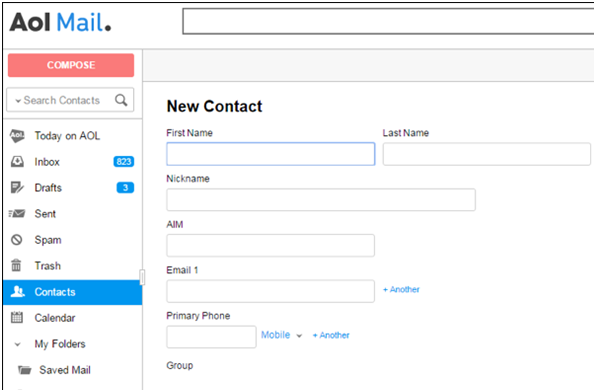
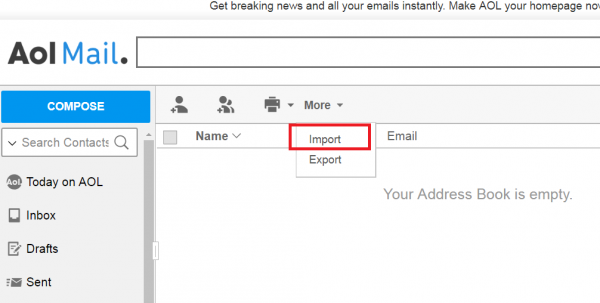
Above the contacts list click on the Tools and then click on Imports.
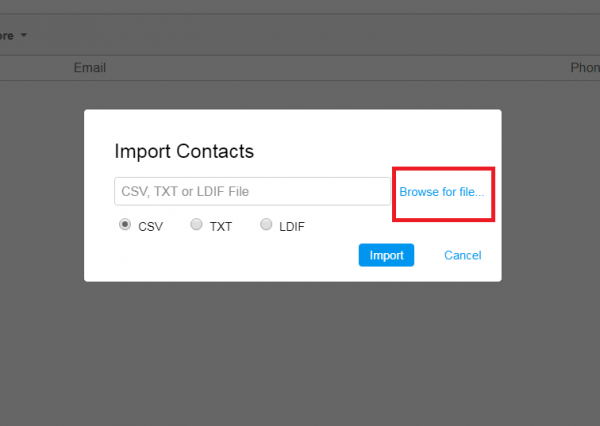
You’ll be prompted to locate a CSV file on your computer. Just click on the “Browse for file….” and then locate your file where it is on your computer or laptop and once you’ve located it press ‘Import’.
The process will take just a few seconds. Once you have imported your contacts you will be able to view them all in your AOL Mail contacts list. You can automatically add info to your contacts, like their picture, their job description, company and much more using a service like Covve.
Covve automatically scans the web, adds contact info and helps you seamlessly stay in touch with your contacts. Check it out here.





2 Comments
Robert Benja 7 years ago
Thanks for helping us.
I was facing issue to import contact from Aol mail but your blog helps to do very easily.
Paula Kolaczek 7 years ago
Hi Robert, thanks for the comment – this is Paula from Covve.
I’m glad that our blog article was helpful!
Best regards,
Paula
Thank you, your comment successfully submitted
your comment has been submited, it might take a while to be moderated.