

Recently, Skype has fallen victim to virus attacks, where hackers were able to steal usernames and passwords to gain access to accounts and send annoying spam messages. If you are one of those users that claim to receive strange links from random Skype contacts, or if you are just tired of your current username, you may want to export your contact list and transfer it to a new Skype account.
Here is an easy five-steps way to transfer contacts between Skype accounts :
1) Sign in to your old Skype account and click Contacts > Advanced > Backup Contacts to file.
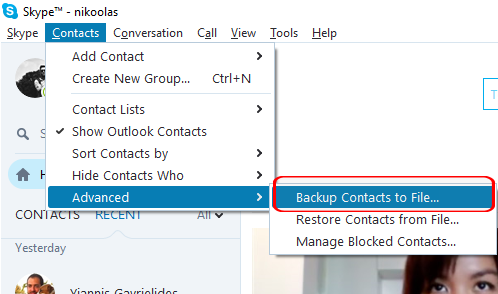
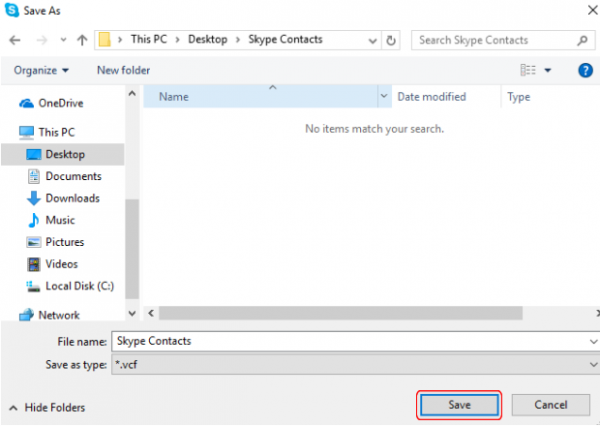
2) Choose the desired location that you want to save this file on your computer and click Save.
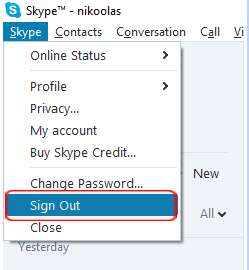
3) Sign out from your old Skype account, and login to your new one.
4) Then, click Contacts > Advanced > Restore Contacts from File.
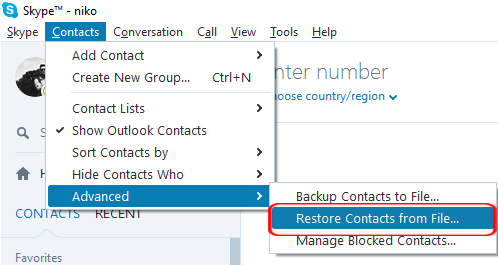
5) Click Open to load your contact list in your new Skype account.






One Comment
wyatt wilson 8 years ago
Would there be a way to restore them, without access to your old account, by just using your files?
Thank you, your comment successfully submitted
your comment has been submited, it might take a while to be moderated.