

If you need to edit or remove a contact from Alexa you will need to go to the Alexa app on your device.
Update: this functionality was disabled by Alexa in a recent update, so you are no longer able to delete contacts from Alexa.
Update 2: we have just launched an Alexa Skill – Your Contacts News reading you the latest news affecting your contacts and their companies!
The skill give you the perfect excuse to reach out to a friend or acquittance to ensure you build and maintain contact and rapport: congratulate them on their recent acquisition, or take a jab at their newly announced dress-code policy!
It takes 3 easy steps to setup:
- Download and sign-up to Covve, available for both Android and iOS
- Enable the Alexa skill Your Contacts News
- Authenticate (login) with Covve and you are done – just ask Alexa to “Open my contacts news”, and you will get the 5 most recent news stories affecting your contacts and their companies.
Covve’s AI-powered News Engine scans more than 150 news sources, reads the articles and understands what companies they are referring to, what the key message of the article is, how important it is to the company and which of your contacts are affected by it.
How you could previously remove contacts from Alexa – not available since a recent Alexa update:
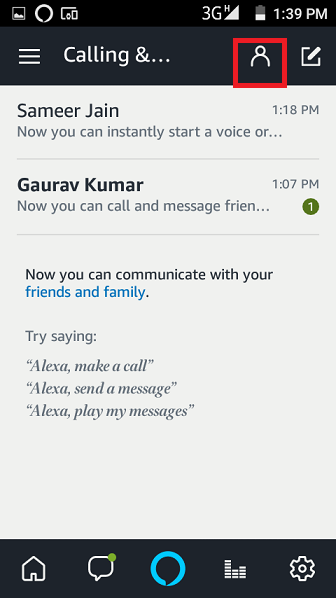
Open the Alexa app. Go to Conversations tab in your Alexa account.

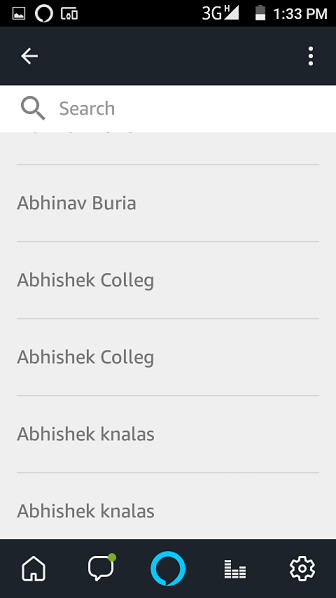
Click on the contacts icon in Alexa. It will show you all of the contacts that you have.
Locate the contact that you wish to delete and select that contact and then click on the delete or block button.
We are obsessed with everything about contacts so feel free to reach out to us on [email protected].


4 Comments
Geoffrey Goetz 7 years ago
This article was not helpful and it does not work with the latest version of the app.
Besides, I want to remove ALL contacts, not just one at a time.
Paula Kolaczek 7 years ago
Hi Geoffroy, thanks for writing in – this is Paula from Covve.
The Alexa app shows all of the contacts saved to your mobile device.
You can delete any contact created in the Alexa app by visiting that contact’s individual contact card.
Unfortunately it’s not possible to delete all the contacts at once.
Hope this helps!
Best regards,
Paula
Peter 7 years ago
Contacts imported from a phone or tablet can’t be edited or deleted!!
Paula Kolaczek 7 years ago
Hi Peter, thanks for writing in – this is Paula from Covve.
The Alexa app shows all of the contacts saved to your mobile device.
You can delete any contact created in the Alexa app by visiting that contact’s individual contact card.
Bulk editing or removing contacts from Alexa is currently not available!
Hope this helps!
Best regards,
Paula
Thank you, your comment successfully submitted
your comment has been submited, it might take a while to be moderated.